IVPN for Linux
Supports 64-bit Linux 3.10+
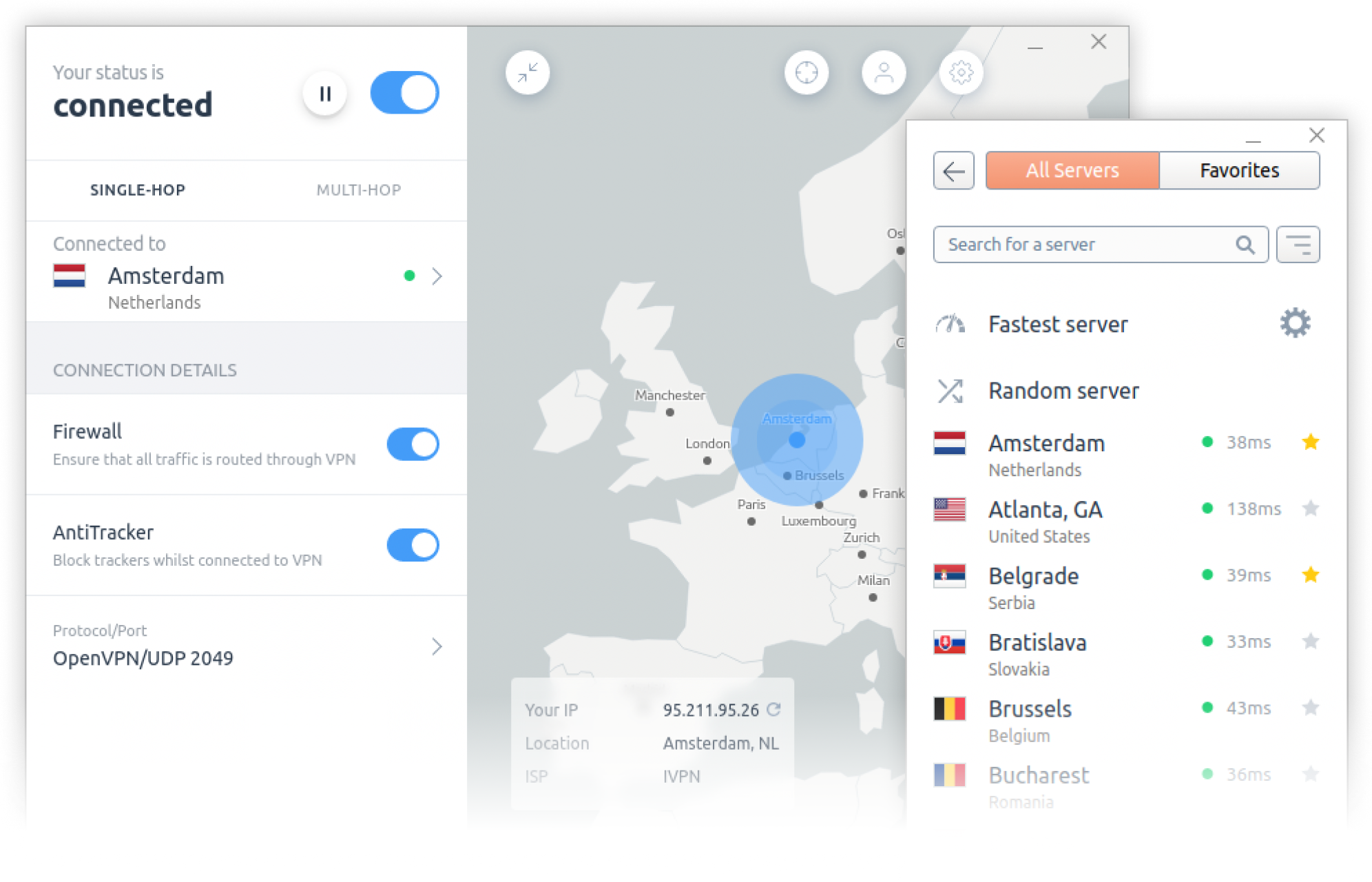
Features
- WireGuard or OpenVPN protocols.
- Quantum-resistant WireGuard connections.
- GUI or CLI (command-line interface).
- WireGuard privacy controls - Define automatic key and IP address rotation schedule.
- AntiTracker that blocks ads, adware, malicious websites and data harvesting trackers.
- Firewall / kill switch - Ability to configure as on-demand or always-on. Protects against DNS, IPv6 and disconnection leaks.
- Ability to define trusted Wi-Fi networks and create rules for automatic VPN connection/disconnection.
- Multi-hop VPN routes. Connect through multiple servers in separate jurisdictions for enhanced privacy.
- Allow LAN traffic when connected to VPN.
- Pause VPN for when disabling VPN connection temporarily is required.
- V2Ray and obfs4 options to circumvent censorship.
- Custom DNS servers, with DoH.
- Split Tunnel to allow designated apps to bypass the VPN tunnel.
Packages
Base Package
Base package contains everything you need to connect to IVPN with command line interface. IVPN GUI app is provided as a separate package you can find below.
Changelog
IVPN GUI App
Please note: base package is required to be installed prior to installing GUI app.
Changelog
Install from IVPN Repository
Ubuntu
# Add IVPN's GPG key
curl -fsSL https://repo.ivpn.net/stable/ubuntu/generic.gpg | gpg --dearmor > ~/ivpn-archive-keyring.gpg

sudo mv ~/ivpn-archive-keyring.gpg /usr/share/keyrings/ivpn-archive-keyring.gpg

# Set Appropriate Permissions for GPG key
sudo chown root:root /usr/share/keyrings/ivpn-archive-keyring.gpg && sudo chmod 644 /usr/share/keyrings/ivpn-archive-keyring.gpg

# Add the IVPN repository
curl -fsSL https://repo.ivpn.net/stable/ubuntu/generic.list | sudo tee /etc/apt/sources.list.d/ivpn.list

# Set Appropriate Permissions for Repository
sudo chown root:root /etc/apt/sources.list.d/ivpn.list && sudo chmod 644 /etc/apt/sources.list.d/ivpn.list

# Update APT repo info
sudo apt update

# To install IVPN software (CLI and UI)
sudo apt install ivpn-ui

# To install only IVPN CLI
sudo apt install ivpn
Debian
# Add IVPN's GPG key
curl -fsSL https://repo.ivpn.net/stable/debian/generic.gpg | gpg --dearmor > ~/ivpn-archive-keyring.gpg

sudo mv ~/ivpn-archive-keyring.gpg /usr/share/keyrings/ivpn-archive-keyring.gpg

# Set Appropriate Permissions for GPG key
sudo chown root:root /usr/share/keyrings/ivpn-archive-keyring.gpg && sudo chmod 644 /usr/share/keyrings/ivpn-archive-keyring.gpg

# Add the IVPN repository
curl -fsSL https://repo.ivpn.net/stable/debian/generic.list | sudo tee /etc/apt/sources.list.d/ivpn.list

# Set Appropriate Permissions for Repository
sudo chown root:root /etc/apt/sources.list.d/ivpn.list && sudo chmod 644 /etc/apt/sources.list.d/ivpn.list

# Update APT repo info
sudo apt update

# To install IVPN software (CLI and UI)
sudo apt install ivpn-ui

# To install only IVPN CLI
sudo apt install ivpn
Mint
# Add IVPN's GPG key
curl -fsSL https://repo.ivpn.net/stable/mint/generic.gpg | gpg --dearmor > ~/ivpn-archive-keyring.gpg

sudo mv ~/ivpn-archive-keyring.gpg /usr/share/keyrings/ivpn-archive-keyring.gpg

# Set Appropriate Permissions for GPG key
sudo chown root:root /usr/share/keyrings/ivpn-archive-keyring.gpg && sudo chmod 644 /usr/share/keyrings/ivpn-archive-keyring.gpg

# Add the IVPN repository
curl -fsSL https://repo.ivpn.net/stable/mint/generic.list | sudo tee /etc/apt/sources.list.d/ivpn.list

# Set Appropriate Permissions for Repository
sudo chown root:root /etc/apt/sources.list.d/ivpn.list && sudo chmod 644 /etc/apt/sources.list.d/ivpn.list

# Update APT repo info
sudo apt update

# To install IVPN software (CLI and UI)
sudo apt install ivpn-ui

# To install only IVPN CLI
sudo apt install ivpn
Fedora
# [Info] Repository GPG signing key fingerprint:
#        F526 91AB 05F2 FCDF 67CD  6516 D437 F3E1 50DB 096C

# [Fedora 40 and below] Add the IVPN repository
sudo dnf config-manager --add-repo https://repo.ivpn.net/stable/fedora/generic/ivpn.repo

# [Fedora 41+] Add the IVPN repository
sudo dnf config-manager addrepo --from-repofile=https://repo.ivpn.net/stable/fedora/generic/ivpn.repo

# [Fedora 42+]
sudo dnf install iptables-legacy

# To install IVPN software (CLI and UI)
sudo dnf install ivpn-ui

# To install only IVPN CLI
sudo dnf install ivpn
CentOS/Alma/Rocky
# [Info] Repository GPG signing key fingerprint:
#        F526 91AB 05F2 FCDF 67CD  6516 D437 F3E1 50DB 096C

# Install Extra packages
sudo dnf install epel-release

# Install OpenVPN
sudo dnf install openvpn

# Add the IVPN repository
sudo dnf config-manager --add-repo https://repo.ivpn.net/stable/centos/generic/ivpn.repo

# To install IVPN software (CLI and UI)
sudo dnf install ivpn-ui

# To install only IVPN CLI
sudo dnf install ivpn

# Required for CentOS 8
sudo dnf install libXScrnSaver
Arch Linux
AUR - ArchLinux User Repository. Can be used by distributions based on ArchLinux: (e.g. ArchLinux, Manjaro …)
Base package: ivpn
UI package: ivpn-ui
Using a AUR helper/Pacman wrapper automates the installation process:
yay -S ivpn
yay -S ivpn-ui
Note: Other AUR helper/Pacman wrapper utilities are available.
Fedora Silverblue
IVPN client can be installed on Fedora Silverblue.
Install from Binaries
.DEB
Base package
SHA256: 5f6bfe9ecaef20667abd3621293e9cda124277cc6b6797a101819f87509fa55e
UI package
SHA256: a70303ddb5bd0365862b6b49a7b82c7e90388ea01fd10cd19d08a017e3729045
.DEB arm64
Base package
SHA256: 78242de3c3ef4128eb107bc5c10254f0df97bbc3e04d43cc1b62c5c05409bb7d
UI package
SHA256: 3d88dd0d87860828c21c41a55f49ea05f638609ee3772179ca32d9de171bc04d
.RPM
Base package
SHA256: 4a325bb51955b2834c4c6d095b9aa00b5a3093d17e0aba4b4698245bab47e260
UI package
SHA256: 6da7dfdb94f33fd5e93b5a24a9fc13bf22fdc4674ec1124d94e2b986bc52949f
.RPM arm64
Base package
SHA256: c7813f82b1cfd6dc27dad545584fafce20293dd4f6a4c01c11603cdd4ca3a043
UI package
SHA256: 0e19d29d804a0d469a9f091a9fb10e0e2a3afe9ce34ab525467364a11408ba83
Install from Source Code
Install the Snap
Get the IVPN App from the Snap Store by typing sudo snap install ivpn.


Snap Notes:
- The snapd daemon is required.
- Uninstall prior versions (DEB, RPM, etc.) of the IVPN App before switching to the snap release channel and vice versa.
- The Split Tunnel feature is not available due to strong restrictions of the snap environment.
Useful Links
If you prefer not to use the IVPN app please follow the relevant setup guide below.
Suggest an edit on GitHub.